 How to Create a Facebook Business Page in 7 Easy Steps
In today’s digital age, having a strong online presence is compulsory for any business. And one of the most effective ways to reach your target audience online is through a Facebook business page. With over 2.91 billion active users worldwide, Facebook is an incredibly powerful platform for connecting with potential customers and promoting your brand.
Creating a Facebook business page is a straightforward process that can be completed in just a few simple steps. In this comprehensive guide, we’ll walk you through the process step by step, from setting up your page to optimizing it for search engines.
How to Create a Facebook Business Page are as follow:
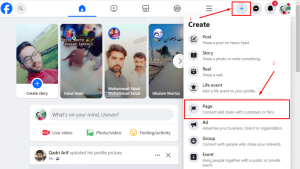
Step 1: Create a New Facebook Account
If you already have a personal Facebook account, you can use that account to create your business page. However, if you don’t have a Facebook account, you’ll need to create one first.
To create a new Facebook account, simply visit Facebook.com and click on the “Create New Account” button. You’ll then be prompted to enter your name, email address, password, and birthday. Once you’ve entered this information, click “Sign Up” button.
Step 2: Go to the “Pages” Section
Once you’ve logged into your Facebook account, navigate to the “Pages” section. This can be done by clicking on the “Pages” icon in the left-hand menu.
Step 3: Enter Your Page Name and Category
On the “Pages” page, you’ll see a button that says “Create New Page.” Click on this button and you’ll be taken to a page where you can enter your page name and category.
Your page name should be the name of your business. If your business has a registered trademark, you can include the trademark symbol (®) after your name.
Your page category should be a broad category that describes your business. For example, if you own a restaurant, you would choose the “Restaurant & Café” category.
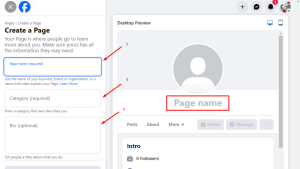
Step 4: Add Your Page’s Bio
After you’ve entered your page name and category, you’ll be prompted to add a brief description of your business. This is your opportunity to tell potential customers about what you do and what makes your business unique.
Your bio should be concise and informative. Keep it to a few sentences and make sure to use keywords that people are likely to search for.
Step 5: Include Your Business Details
In the next step, you’ll be asked to enter your business contact information. Like your website, number, and email address ,business address etc. You can also add your business address if you have a physical location.
Make sure to double-check your contact information to ensure that it is accurate and up-to-date.
Step 6: Put Together Your Profile Imagery
Your profile imagery is the first thing people will see when they visit your page, so it’s important to make a good impression.
For your profile picture, choose a high-quality image of your business logo. For your cover photo, choose an image that is visually appealing and represents your brand.
Step 7: Customize Your Page
Once you’ve added your profile imagery, you can start customizing your page. This includes adding additional sections, such as a menu, photos, and videos.
You can also add a call to action button to encourage visitors to take a specific action, such as liking your page, visiting your website, or signing up for your email list.
Step 8: Invite Friends and Followers
Once your page is up and running, it’s time to start inviting your friends and followers to like it. You can do this by sending them a personal message or by posting an invitation on your personal Facebook wall.
You can also grow your page by running Facebook ads. This is a great way to reach a wider audience and attract new followers.
Step 9: Start Posting Content
The final step is to start posting content to your page. This could include blog posts, articles, photos, videos, and links to other websites.
The key is to post content that is relevant to your target audience and that will keep them engaged. You should aim to post at least once a day, but more is often better.
Additional Tips for Creating a Successful Facebook Business Page
- Use high-quality images and videos.
- Write engaging and informative content.
- Respond to comments and messages promptly.
- Run Facebook ads to reach a wider audience.
- Track your page’s performance and make changes as needed.
By following these simple steps, you can create a Facebook business page that will help you connect with your target audience, promote your brand, and grow your business.
Pros (Advantages)
- Grow your brand: More people will see and remember your brand.
- Get more website visitors: Send people from Facebook to your website.
- Show targeted ads: Reach the right people with your ads.
- Talk to customers: Answer questions and build relationships.
- Save money on marketing: Facebook pages are free to create.
Cons (Disadvantages)
- Takes time and effort: You need to post often and answer comments.
- Facebook’s rules change: What works today may not work tomorrow.
- People may complain: Be prepared for negative feedback.
- There are hackers: Protect your page from bad guys.
- Lots of competition: It’s hard to stand out from the crowd.
In summary, having a Facebook business page can help your business grow, but it takes time and effort.

Important FAQ’S:
1:How do I set up a Facebook business page?
Setting up a Facebook business page is a straightforward process that can be completed in a few simple steps:
-
Create a Facebook account: If you don’t already have a Facebook account, you’ll need to create one to manage your business page. This is easy process that only takes a few minutes.
-
Navigate to the “Pages” section: Once you’ve logged into your Facebook account, go to the “Pages” section. You can find this by clicking on the “Pages” icon in the left-hand menu.
-
Click on “Create New Page”: This will take you to a page where you can start setting up your business page.
-
Enter your page name and category: Choose a name that represents your business and select the appropriate category from the list provided.
-
Add your page’s bio: Write a brief description of your business and what you offer. This is an opportunity to tell potential customers about your brand and what makes you unique.
-
Include your business details: Add your business contact information, such as your website, phone number, and email address. You can also add your business address if you have a physical location.
-
Put together your profile imagery: Upload a profile picture and cover photo that are high quality and represent your brand. Your profile picture should be a logo or other identifiable image of your business, while your cover photo should be visually appealing and capture the essence of your brand.
-
Customize your page: Once you’ve added your profile imagery, you can start customizing your page. This includes adding additional sections, such as a menu, photos, and videos. You can also add a call-to-action button to encourage visitors to take a specific action, such as liking your page, visiting your website, or signing up for your email list.
-
Invite friends and followers: Once your page is up and running, invite your friends and followers to like it. You can do this by sending them a personal message or by posting an invitation on your personal Facebook wall. You can also grow your page by running Facebook ads.
-
Start posting content: The final step is to start posting content to your page. This could include blog posts, articles, photos, videos, and links to other websites. The key is to post content that is relevant to your target audience and that will keep them engaged. You should aim to post at least once a day, but more is often better.
2:Can we create a Facebook business page for free?
Yes, creating a Facebook business page is 100% free. There are no upfront costs or ongoing fees to maintain your page. This makes it an accessible and cost-effective marketing tool for businesses of all sizes.
3:How can I create an FB account for my business?
Creating a Facebook account for your business is just like creating a personal account. You’ll need to provide your business name, email address, password, and birthday. Once you’ve created your account, you can then proceed to set up your business page.
4:How do I turn my Facebook profile into a business page?
If you already have a personal Facebook profile, you can convert it into a business page. To do this, follow these steps:
- Go to your personal Facebook profile.
- Click on the “Settings & Privacy” menu in the top right corner of the screen.
- Select “Settings.”
- Go and click on “Page Settings” in the left-hand menu.
- Select “Category” and choose the appropriate category for your business.
- Click on the “Save” button and then click on “Convert Page.”
Your personal profile will now be converted into a business page. You will then be able to add your business information, customize your page, and start posting content.
Why create a Facebook business page?
There are many reasons why you should create a Facebook business page. Here are just a few:
- Reach a large audience: Facebook has over 2.91 billion active users worldwide. This means that you can reach a large audience of potential customers by creating a Facebook business page.
- Promote your brand: Your Facebook business page can be a great way to promote your brand and products or services. You can use your page to share news and updates, run contests and promotions, and connect with your target audience.
- Generate leads: Your Facebook business page can be a valuable lead generation tool. You can use your page to collect email addresses, encourage people to sign up for your mailing list, and offer incentives for people to contact you.

How Promotional Waves can help your business
Promotional Waves is a full-service digital marketing agency that can help you create and grow your Facebook business page. We offer a variety of services, including:
- Page setup and optimization: We will help you create a professional and engaging Facebook business page that is optimized for search engines.
- Content creation and management: We will create and manage high-quality content that will keep your audience engaged and coming back for more.
- Social media advertising: We will help you run targeted social media ads that will reach your ideal customers.
- Analytics and reporting: We will track your page’s performance and provide you with regular reports so you can see how your efforts are paying off.
Contact Promotional Waves today to learn more about how we can help your business grow on Facebook.
Additional tips for creating a successful Facebook business page
- Use high-quality images and videos.
- Write engaging and informative content.
- Respond to comments and messages promptly.
- Run Facebook ads to reach a wider audience.
- Track your page’s performance and make adjustments as needed.
How to keep your audience engaged
- Post regularly.
- Share a variety of content.
- Interact with your audience.
- Run contests and promotions.
- Use Facebook Live.
By following these tips, you can create a Facebook business page that will help you connect with your target audience, promote your brand, and generate leads. Tell us do we clear your concept for How to Create a Facebook Business Page?
Comparsion Facebook Business Page and Local Business.
| Feature | Facebook Business Page | Local Business |
|---|---|---|
| Purpose | Promote your business to a global audience | Connect with customers in your local community |
| Target audience | Potential customers worldwide | Local residents and businesses |
| Content | A variety of content, including blog posts, articles, photos, videos, and links to other websites | Content specifically focused on your local area, such as events, promotions, and news |
| Advertising | Targeted advertising options to reach a specific audience | Limited advertising options, typically focused on reaching people in your local area |
| Engagement | Build relationships with customers through comments, messages, and polls | Engage with customers through reviews, posts, and events |
| Growth | Can grow to a large audience with a global reach | Growth is typically limited to the local area |
| Cost | Free to create and maintain | May have a fee to create and maintain |
| How to Create a Facebook Business Page | 1. Go to Facebook.com and log in to your account. 2. Click on the “Create” button in the top right corner of the screen. 3. Select “Page” from the dropdown menu. 4. Enter your page name and category. 5. Add your page’s bio. 6. Include your business details. 7. Put together your profile imagery. 8. Customize your page. 9. Invite friends and followers. 10. Start posting content. | 1. Go to business.facebook.com and log in to your Facebook account. 2. Click on the “Create” button in the top right corner of the screen. 3. Select “Local Business Page” from the dropdown menu. 4. Enter your business name and address. 5. Select your business category. 6. Add your business phone number and website (if applicable). 7. Upload a profile picture and cover photo. 8. Write a description of your business. 9. Click on the “Create Page” button. |
| Overall | A great way to reach a large audience and promote your business worldwide | A valuable tool for connecting with customers in your local community |